

Experimenting with AI Automation
Exploring the ease, limitations, and possibilities of AI-driven content creation

Testing the Capabilities of AI Tools
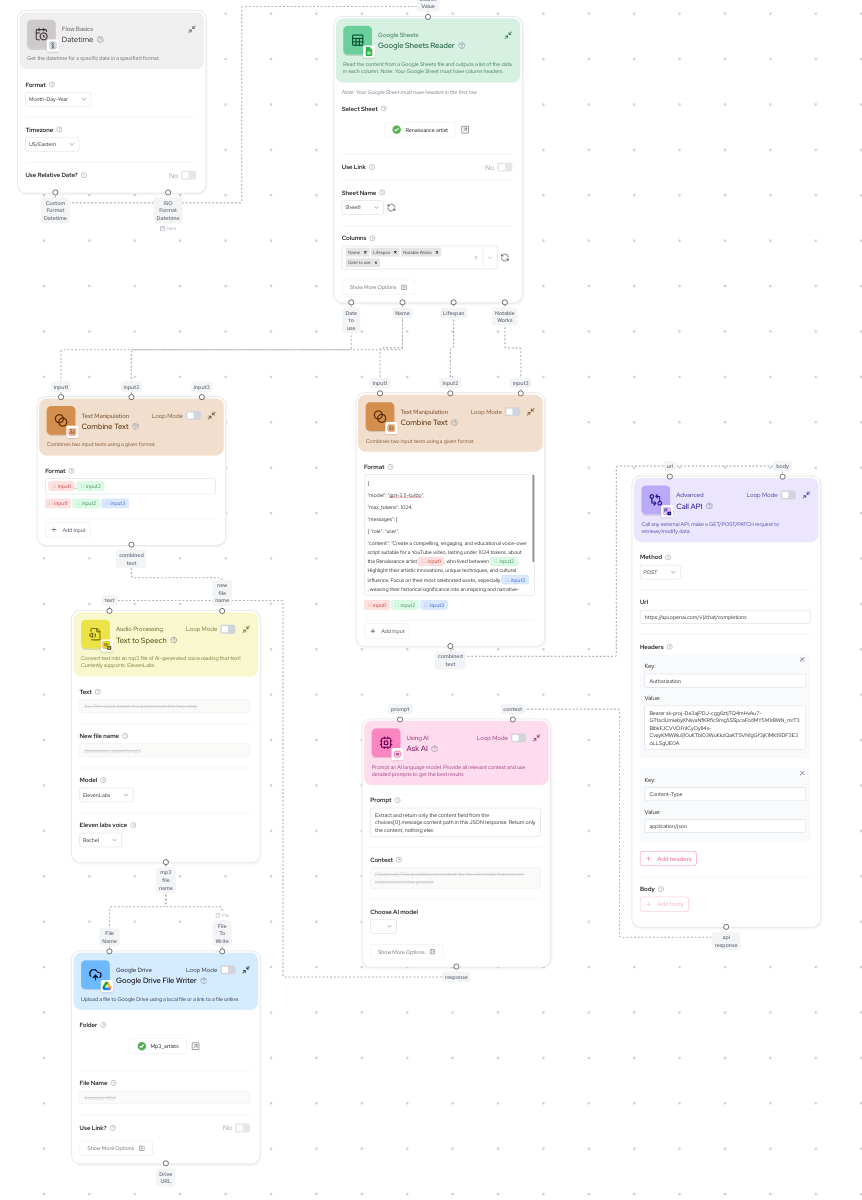
My latest experiment was about exploring the experience of using an AI workflow tool—their capabilities, limitations, and how seamlessly they can work together. I wanted to test how easy it would be to set up an automated workflow using Gumloop, OpenAI, and ElevenLabs to generate an AI-driven voiceover, store it as an MP3 file, and evaluate the overall process.
Why This Experiment?
I am interested in how intuitive and efficient these AI-powered tools are. Could I automate a topic to a generated video file with minimal manual effort? And more importantly, where would the process break down?
The Setup: Simple and Fast
To my surprise, the entire setup took me less than three hours, most of which was spent on administrative tasks like creating accounts and generating API keys. The actual process of integrating AI tools was smooth, with an intuitive workflow that made the experiment feel effortless.
Here’s how I structured it:
Text Generation with OpenAI – I used OpenAI to generate a basic script.
Text-to-Speech with ElevenLabs – I fed the script into ElevenLabs, which synthesized a natural, engaging voiceover.
Text-to-Video – I tried this but it didn’t wasnt easy and ran into logistical issues & limitations.
Automation in Gumloop – I used Gumloop to automate the process and ensure the final output was stored as an MP3 file.
What Worked Well
User Experience: The workflow was simple and easy to use, making it possible to go from concept to execution in just a few hours.
Voice Quality: ElevenLabs delivered a realistic and expressive AI-generated voiceover, making the narration smooth and lifelike.
Seamless Automation: With Gumloop handling automation, I was able to get everything running with minimal intervention.
What Didn’t Work well for me
JSON Reader Tool: The JSON reader couldn’t properly parse OpenAI’s API response, which meant I had to rely on an inbuilt AI-based data extractor to interpret the data correctly.
Lack of Map Output Support: When exploring additional ways to visualize outputs, I found that Gumloop does not currently support map-based outputs—a potential area for future improvements. As an example, I couldn't use a map output to place where the artist worked and during what years.
Lack of access to video creation: Gumloop provides access to Arcads as a video creation tool. However Arcads is only available if you setup an entity & get API keys set up and sent you. This just proved to be a logistical barrier.
I'm curious about AI-driven text-to-video generation tools that can automatically generate relevant visual content based on a text input. Are there any existing solutions that do this effectively?
Final Thoughts and Next Steps
This experiment was all about testing the experience of using these AI tools. With just a few hours of setup, I was able to create a fully automated, AI-driven workflow. As Gumloop adds more tools, it’ll likely become a much more powerful tool.
Looking ahead, I’d love to refine this process further—perhaps testing more complex automation, exploring different AI models such as fine-tuned GPT models or multimodal AI like OpenAI’s Sora, and experimenting with various output formats, including video, interactive media, or synthetic voice layering. There’s so much potential in automating content creation, and these are early days!
Would you try a similar AI-powered experiment? Let me know your thoughts!
Nice review!